
Custom User Titles
Custom Tags
Section titled “Custom Tags”Location: `LOTUS_DATA/Titles’
File Type: yaml
File Name: Among Us Friend Code (e.g. envykindly#7034)
Custom tags allow for players to add colors to their username as well as titles above their username in Among Us. In order for a host to add a players custom tag, they’ll need to create a yaml file with any/all of the following information:
UpperText: Text: # This is the text that goes above your username Gradient: # Creates a gradient FROM Color 1 to Color 2 automatically Size: # Default AU size is 2
Name: # This is the size and color/gradient attributed to your username. Leave this line blank and fill in the options below Gradient: # Creates a gradient from Color 1 to Color 2 automatically. For gradient enter "[hex 1], [hex 2]" (refer to examples above) Size: # Default AU size is 2
Prefix: # This is the size, color, and text that goes before your username. Leave this line blank and fill in the options below Spaced: # This field is either True or False and used if there should be a space between the Suffix and the player's username (example: ♥ shiftyrose) Text: # Add the text you'd like to go before your username here Color: # Add the hex code that you'd like the prefix to be here Size: # Default AU size is 2
Suffix: # This is the size, color, and text that goes after your username. Leave this line blank and fill in the options below Spaced: # This field is either True or False and used if there should be a space between the Suffix and the player's username (example: shiftyrose ♥) Text: # Add the text you'd like to go before your username here Color: # Add the hex code that you'd like the prefix to be hereSize: # Default AU size is 2
LowerText: Text: # This is the text that goes below your username Gradient: # Creates a gradient FROM Color 1 to Color 2 automatically Size: # Default AU size is 2
Creating A New Title:
Navigate to the /LOTUS_DATA/Titles directory
Create a new yaml file named: [friendcode].yaml (example: buffdulcet#0871.yaml)
Set up the title components in the yaml
Available Components:
| Components | Description |
|---|---|
| UpperText | Responsible for the text above the player’s username |
| LowerText | Responsible for the text below the player’s username |
| Prefix | The text that comes before a player’s username |
| Suffix | The text that comes after a player’s username |
| Name | The player’s username |
The player’s username is the name they enter the lobby with or change with /name. It is not specified directly in the yaml file.
Component Items:
These are the things you can define for each component to change
| Item | Description |
|---|---|
| Text | Sets the text for the component (does not work for Name) |
| Gradient | A list of HTML color codes defining a range of colors to apply to the text. (Refer to the example image) |
| Color | If gradient is not specified, a solid color to apply to the text |
| Size | The size of the text (default is 2) |
| Spaced | (Only applicable to Prefix & Suffix) Whether the text should have a space between it and the player’s name |
Lastly you can reload your (local) title files with the command ‘/tload’, the change is immediate
Example Tags
Section titled “Example Tags”Example 1
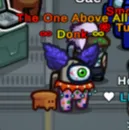
Section titled “Example 1”UpperText: Text: The One Above All Gradient: "#ff0000, #e1e100" #Creates a gradient FROM Color 1 to Color 2 automatically Size: 2 # Default AU size is 2, i believe this is exponential (so 100 would be terrible)
Name: Gradient: "#e1e100, #ff0000" #Creates a gradient FROM Color 1 to Color 2 automatically Size: 2 # Default AU size is 2, i believe this is exponential (so 100 would be terrible)
Prefix: Spaced: True # If there should be a space between the Suffix and the player's name (example: Akali ♥) Text: ∞ Color: "#ff0000" Size: 2 # Default AU size is 2, i believe this is exponential (so 100 would be terrible)
Suffix: Spaced: True # If there should be a space between the Suffix and the player's name (example: Akali ♥) Text: ∞ Color: "#e1e100" Size: 2 # Default AU size is 2, i believe this is exponential (so 100 would be terrible)Output:
Example 2
Section titled “Example 2”Name: Gradient: "#3BCFD4, #FC9305, #F20094"
UpperText: Size: 1.925 Text: ♡ Tipsy ♡ Gradient: "#3BCFD4,#F20094, #F74B4B, #FC9305,#96B373, #3BCFD4,#F20094"
Prefix: Text: ♥ Spaced: true Color: "#F20094"
Suffix: Text: ♥ Spaced: true Color: "#3BCFD4"Output: